






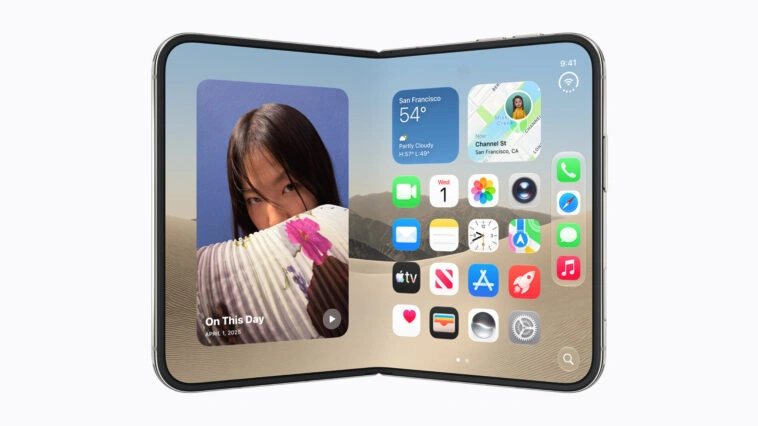
Apple has released a new set of developer resources for iPhone Duo, outlining how iOS apps should adapt to the company’s first foldable iPhone and its combination of inner and outer displays ahead of the device’s October launch.
Published following the iPhone Duo announcement, the resources include six developer videos, updated Human Interface Guidelines, upcoming Xcode tools, online Group Labs, developer Q&A sessions and in-person workshops. Apple is using the material to explain how existing iPhone apps can handle the device’s changing screen sizes and multiple physical configurations.
A central part of Apple’s guidance is resizability. Rather than encouraging developers to create separate interfaces for each iPhone Duo configuration, Apple recommends building adaptive layouts that respond dynamically as the device opens, closes, rotates or partially folds.

The iPhone Duo includes an outer display and an inner display, with a central hinge allowing the device to operate in multiple poses. When closed, users interact with the outer screen. Opening the device provides a larger inner workspace, while partially folded configurations can divide the available display area around the hinge.
Apple says developers should use size classes, layout margins and safe area insets rather than fixed dimensions or assumptions tied to a specific display. The outer display uses a compact-width layout, while the larger inner display provides a regular-width environment that can accommodate interfaces such as sidebars and multi-column layouts.
Apps built with standard system components and existing responsive layouts should adapt to many of these configurations with limited additional work. Apple specifically advises developers against creating an entirely different interface for every physical pose, instead recommending that existing layouts expand or contract according to the space available.

The hinge introduces another layout consideration. Apple defines a folding region that can become a reserved area when the device is partially open. Apps need to account for this region alongside other reserved areas, including the device’s front-facing cameras.
iPhone Duo has two front-facing cameras. The outer camera remains visible and sits in the corner of the display, while the inner camera is located behind the screen and becomes visible when activated. System components can automatically adjust around these areas when developers use Apple’s standard layout frameworks.

Apple is also changing where some familiar iPhone interface elements appear. On several iPhone Duo configurations, toolbars, tab bars, navigation controls, the status bar and Dynamic Island move to the side of the display rather than remaining along the top or bottom.
The vertical arrangement is intended to preserve more space for content when the device is used in wider configurations. Apple recommends allowing the system to manage these placements rather than overriding them, while developers can prioritize which toolbar items remain visible when space becomes constrained.
Split-view interfaces are another focus. On the inner display, apps can present multiple panes simultaneously before collapsing back into a single-pane interface on the smaller outer screen. Apple uses Mail as an example: the closed device can display either the message list or an individual email, while the expanded inner display can show both at once.
Developers will also be able to use Split View multitasking on the inner display. When two apps share the screen, interface controls can move toward the respective outer edges, allowing each app to maintain access to its navigation and toolbar elements.
Apple is introducing an arrangement view for interfaces that contain two related views. The container can dynamically organize primary and secondary content based on display size, orientation and reserved regions, giving developers another way to adapt interfaces as the hardware changes position.
Existing apps will still run on iPhone Duo without being rebuilt specifically for the device. However, Apple says adopting newer SDKs progressively enables apps to use more of the available display area.
With the iOS 27 SDK, apps can extend further across the inner display, while the upcoming iOS 27.1 SDK and Xcode 27.1 beta add support for reaching the screen edges and automatically arranging standard navigation and toolbar controls vertically.
Xcode 27.1 will also allow developers to test their apps using an iPhone Duo simulator in Device Hub. Developers can virtually open, close, rotate and fold the device to inspect how their layouts respond across different poses before testing on physical hardware.
Additional developer support will continue throughout September. Apple has scheduled online iPhone Duo Group Labs for September 16 and 17, where developers can speak with Apple engineers and designers about updating their apps.
On September 23, Apple will run dedicated Developer Forums Q&A sessions covering Photos & Camera, SwiftUI and UIKit. The company also plans to hold hands-on iPhone Duo workshops around the world later this month, focusing on app optimization and resizable interfaces.
The new resources give developers several weeks to test and adapt their applications before iPhone Duo reaches consumers. While existing apps can run on the foldable device, Apple’s guidance makes adaptive layouts, size classes and dynamic resizing central to taking advantage of its dual-display hardware.
For developers, iPhone Duo introduces a wider range of screen states into the iOS ecosystem. Apps now need to account not only for different iPhone screen sizes, but also transitions between outer and inner displays, partial folds, multitasking configurations and interface controls that can move between horizontal and vertical layouts.




Comments
Loading…