



 Sophie Blake
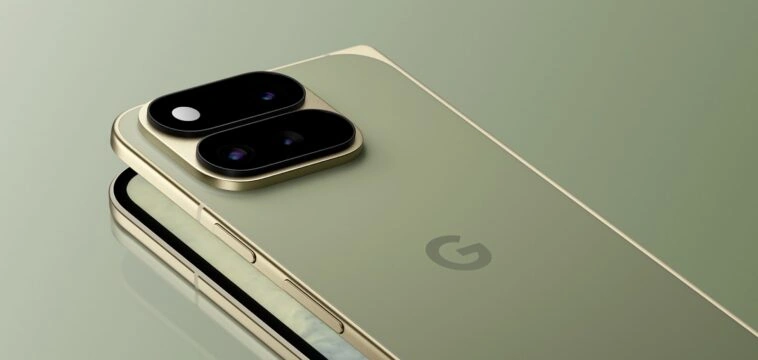
Google has published new guidance for Android developers on adapting apps for its latest Pixel hardware, focusing on the Pixel 11 Pro Fold, Pixel Watch 5 with Wear OS 7, and on-device AI capabilities powered by Gemini Nano 4. The recommendations were released alongside the new Pixel lineup unveiled at Made by Google.
A major part of Google’s guidance centers on foldables. The company says foldable users spend around 14 times more than standard phone users, positioning adaptive app experiences as a potentially important consideration for developers targeting the form factor.
For the Pixel 11 Pro Fold, Google recommends that developers move away from hardcoded layouts and instead design interfaces around the available window space. Jetpack Compose tools including Navigation 3 with Scene strategies, Grid and FlexBox can be used to make layouts automatically wrap, span and reflow across different screen configurations. The experimental MediaQuery API can also adapt interfaces based on signals such as foldable posture and keyboard state.
Google says apps should track their actual window dimensions rather than the physical size of a device, particularly when handling split-screen and multitasking. Window Size Classes from the WindowManager library can be used to adapt layouts while treating folds and hinges as content separators.
Notability is one example cited by Google. The app uses Material 3 Window Size Classes for a responsive two-pane interface that adjusts between folded and expanded screens. Flo Health, meanwhile, combined Jetpack Compose state primitives, ViewModel and Window Size Classes to handle rotation, folding, unfolding and resizing. According to Flo Health, the implementation reduced its state-preservation code by roughly 30% while addressing lifecycle and analytics issues.
Developers can also use FoldingFeature updates to create layouts based on a foldable’s physical posture. In tabletop mode, for example, controls can occupy the lower portion of the display while content or a camera viewfinder remains on the upper section. For camera-based apps, Google recommends CameraX for handling sensor rotation and display scaling, while existing Camera2 implementations can use CameraViewfinder. These tools can also support dual-screen previews and rear-camera selfies.
Google’s guidance extends to Pixel Watch 5 and Wear OS 7. Starting with the 1.7 beta of Compose for Wear OS 7, developers can integrate one-handed gesture controls such as double-pinching and wrist turns into Wear Compose apps. Spotify is adopting the framework to let users pause or resume playback with a double-pinch gesture.
Wear OS 7 also introduces Live Updates on the wrist for real-time information such as sports scores, workout progress and delivery status. Google points to Just Eat as an example, with the company using Live Updates to display delivery status and estimated arrival times. Wear Widgets, built using Jetpack Glance and RemoteCompose, provide another option for glanceable app experiences. Google says Wear OS 7 also delivers up to a 10% battery-life improvement over Wear OS 6.
AI is the third major area covered in the guidance. Pixel 11 devices are designed to run Gemini Nano 4 on-device, allowing supported AI workflows to operate without making round trips to the cloud. Developers can access the model through the ML Kit GenAI Prompt API and send natural-language requests directly to Gemini Nano.
Google says Gemini Nano 4 supports more than 140 languages, along with expanded multimodal capabilities. Developers can also use features including structured output and thinking mode when building on-device AI functionality into their apps.
The company is additionally promoting Android skills, a set of AI-optimized instructions designed for development agents and tools. They can be used with Gemini in Android Studio or with other agents through the Android CLI. Google gives examples including a CameraX skill for managing camera display scaling on foldables and an Adaptive skill for generating dynamic Compose layouts.


Comments
Loading…